Lecture 20 · Parametric Modeling Advanced and AI
Midterm Presentation 3; Scripting and Machine Learning
Lecture 20
Project 1 Presentation 3
Introduction to Scripting and Machine Learning
Scripting Examples and Advanced Examples
-
Python Scripting Examples
Video 4 Example below explained and extended (download: /assets/images/lectures/lecture19/video4_change%20angle.zip):
How to make the angle of the line of circles and points change? -
Advanced Examples
1.1 Python for Grasshopper
Download the sample files (adapted from http://wiki.mcneel.com/labs/grasshoppergallery, VB.NET Code samples by Rajaa Issa, modified into Python for Grasshopper by Wei Yan)
Tasks:
1.1.1 Try to understand why the Python Script can help generate the following geometry.
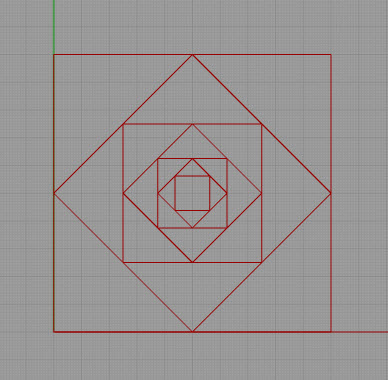
1.1.2 Using the same nodes, modify the Python Script code, so that the inner squares' corner points are located at 1/3 of the outer squares' edges, as shown in the figure below.
You will need to keep the "GetMidPoints" function, and make a copy of it to "GetInbetweenPoints" function, and use this function instead of the "GetMidPoints" function.
Save your Grasshopper file as: Recursive Squares_V1.gh
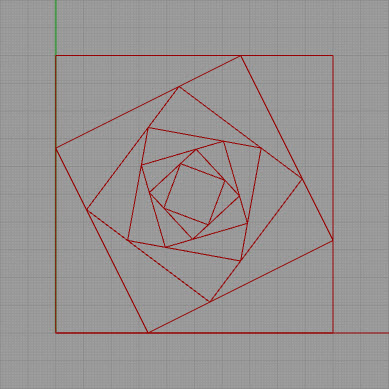
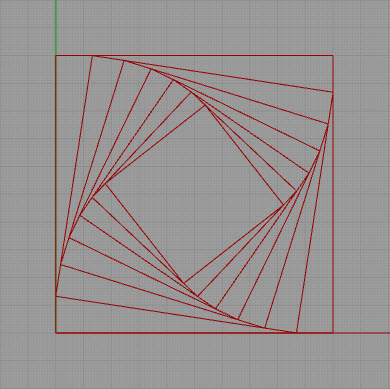
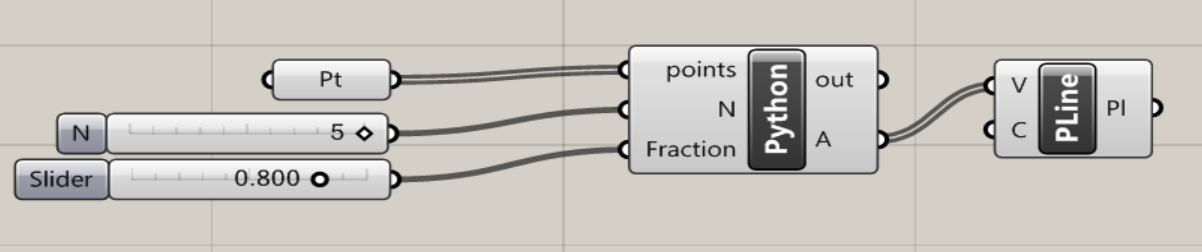
1.1.3 Make a copy of 1.2.2 result, and modify the Grasshopper definition with one more input: Fraction, for the Python Script node. Modify the Python code so that it it will accept Fraction as a "float" data type, and pass it to "GetInbetweenPoints" function, to make the squares' corner points location changeable parametrically, through the slider added in Grasshopper. See the result geometry and the definition below.
Save your Grasshopper file as: Recursive Squares_V2.gh
(No submission is needed for this in class demo)1.2. "Water Flow" Projectile Motion Sample (Optional)
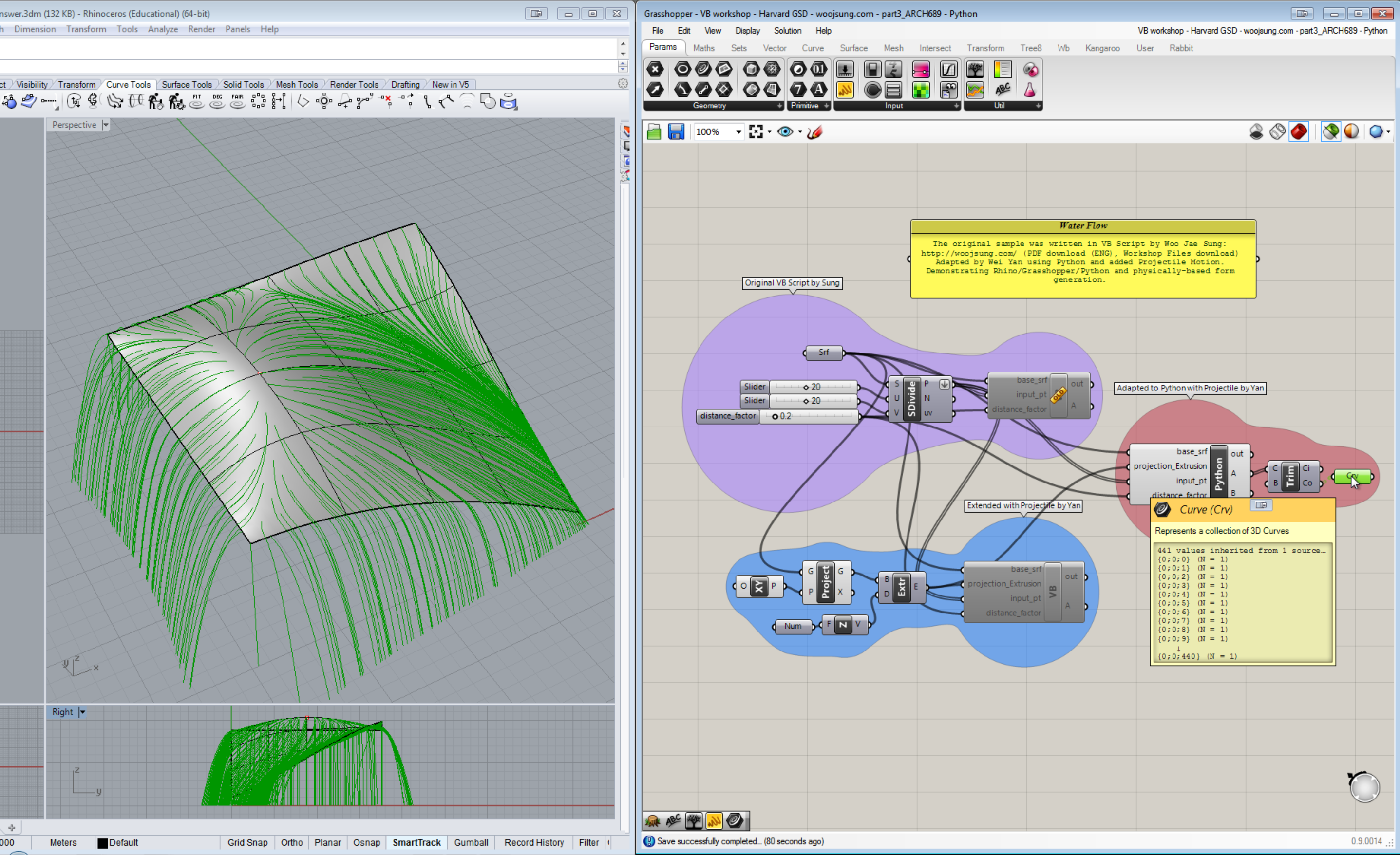
The original sample is from: http://woojsung.com/
The samples are written in VB Script. (The VB Script node in this sample is just a little outdated and you can simply replace the node with the new VB Script node you have, and copy/paste the code to run it.)
Challenge (in a past semester): in the website, find the "Water Flow" model, extend it to a model to allow the water streams continue to fall after reaching the edges of the surface. Each water stream will have a projectile motion until hitting the ground (z = 0). This will also solve the non-smooth edge problem of the existing model.
Use your physics knowdege to create the model. Note that the original model doesn't have inertia considered (it's ok to leave it as is), but you can think how you can use projectile motion that considers inertia and gravity (still leave out the friction).
You can determine the initial states (e.g. velocities) of the water streams close or at the surface edges. Make reasonable assumptions.
Some online resources about parabola and projectile motion will be useful, e.g.- http://en.wikipedia.org/wiki/Projectile_motion
- A sample solution in Python (Play with it and try to understand the code)
-
Homework 8 - Scripting: Getting Started; Initial Introduction to Machine Learning
Complete the following tasks3.1 Watch Video and Do the Exercise following the videos
Make sure you chose the high definition video quality in Vimeo!
Rhino Python Tutorials- TUTORIAL 01: INTRO
- TUTORIAL 02: RHINO REFERENCE
- TUTORIAL 03: LOOPING
- TUTORIAL 04: CONDITIONALS
- TUTORIAL 05: FUNCTIONS
- TUTORIAL 09: LISTS
- TUTORIAL 10: VECTORS
- TUTORIAL 13: GRASSHOPPER AND PYTHON IN RHINO 5 (note that you already have Python node in Grasshopper, therefore you don't need to install separate Python in your Grasshopper.)
Save the code you created following the videos into:
Video1.py, Video2.py, Video3.py, Video4.py, Video5.py, Video9.py, Video10.py, Video13.gh (with the Python script node)
The code is changed during the experiments in the videos, just save the final version of the code for each file is ok.
You can save the .py files from the EditPythonScript window.
3.2 Exercise Submission
| Item | Details |
|---|---|
| Exercise folder name | Homework8_YourLastname |
| File to submit | Homework8_YourLastname.zip |
| Submit to | https://canvas.tamu.edu/ |
| Due | 4/8 Monday, 10:00 PM |
3.3. Reading and Comprehension (Optional for future study)
Download and Read Python for Rhino 101 Primer (No submission needed)
3.4 Initial Introduction to Machine Learning (from 3Blue1Brown)
Watch video: "But what is a neural network? | Chapter 1, Deep learning"
https://www.youtube.com/watch?v=aircAruvnKk
Answer a question related to what we have learned in ARCH 655:
At what time (minute and second) of the video did the author talk about Vectors, Matrix Multiplication, and their use in Machine Learning? Note that we have learned vectors, matrices, and matrix multiplication that can be applied to 3D geometric transformations. They also are applied to high-dimensional neural network for machine learning.
Provide the answer in Canvas -> Homework 8 -> Comments, by the above deadline.
Watch video: "Gradient descent, how neural networks learn | Chapter 2, Deep learning"
https://www.youtube.com/watch?v=IHZwWFHWa-w
Answer a question:
At what time (minute and second) of the video did the author talk about minimizing the value of a simple function as an example Cost Function for the neural network training? Note that the method to find a minimum is just another optimization method (we learned Genetic Algorithm for optimization).
Provide the answer in Canvas -> Homework 8 -> Comments, by the above deadline.