Lecture 05 · Parametric Modeling Basics
Geometry: Matrices and Transformations 1
Lecture 5 Geometry: Matrices and Transformations
-
Vector Mathematics - Challenge
Challenge 1: How to find all points on a plane, based on Sample Grasshopper files -
A. Figure (15): Find mid point between two input points (or Figure 17 on the textbook Essential Mathematics For Computational Design 4th Edition), and
B. Sample 21: Find the plane that goes through three points?
You can parametrically move a point along the two vectors' directions on the plane to demo it. -
Geometry: Matrices and Transformations
Essential Mathematics For Computational Design
Chapter 2 Matrices and Transformations
Slides for matrices and 2D transformations and additional materials (optional) -
Matrices and Transformations - Challenge
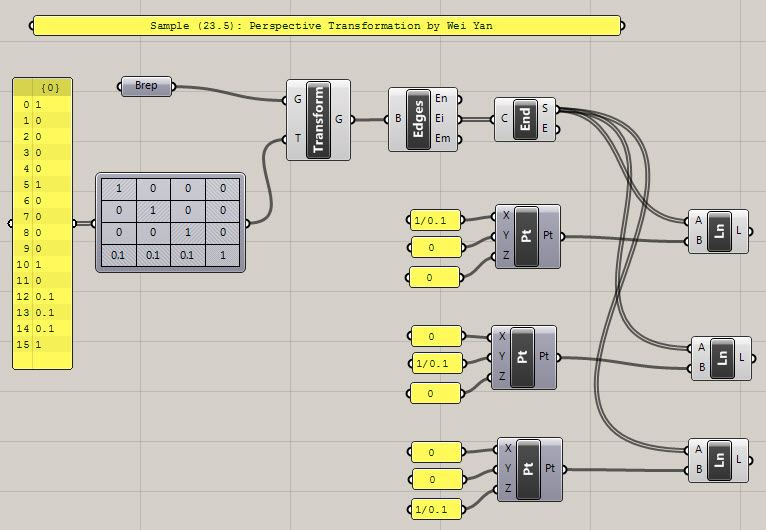
Challenge 2: How to use the Grasshopper Transform Matrix node and Transform node to do:- Translation
- Rotation
- Scale
- Shear
transformations to a Solid (Box) created in Rhino?
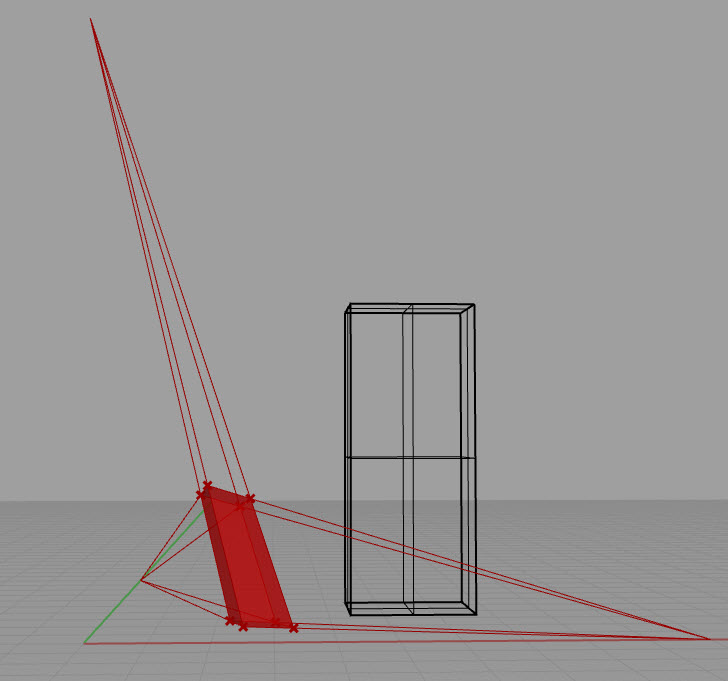
See the demo below for how to use the Transform Matrix and Transform nodes to create Perspective Transformation as an example:
-
Homework3
4.1 Geometry Modeling with Rhino
Self-paced reading and exercise:- Rhino 8 Level 1 Training Guide and Models: https://docs.mcneel.com/rhino/8/training-level1/en-us/Default.htm (Level 1 expected completion date: 3 weeks from now)
- Rhino 8 Level 2 Training Guide and Models: https://docs.mcneel.com/rhino/8/training-level2/en-us/Default.htm (Level 2 expected completion date: 6 weeks from now)
No submission is required for this series of exercises. Report your progress (completed exercise number) on Canvas using comments, with each Homework submission. You may skip the exercises that we have already done in previous video tutorials (e.g. the Rubber Duck).
4.2 Parametric Modeling with Grasshopper
4.2.1 Study Chapter 1 Vector Mathematics of: Essential Mathematics For Computational Design
and create the Grasshopper models for samples from Vector Mathematics / Tutorials 1 to 3 (GH Solutions only. No need to do the VB, C#, Python scripting part). You can use the source file of the book: TheEssentialMathematics_4thEdition2019.gh, as your reference file. Work directly in the file and create your node graph on the right side of each existing graph, or create your own new file. Don't copy/paste the existing nodes, instead create them by yourself. Save your final file as:
EssentialSamples_Chapter1_Turorials_YourFirstname_YourLastname.gh
and save it into Homework3_YourFirstname_YourLastname folder.4.2.2 Study Chapter 2 Matrices and Transformations of: Essential Mathematics For Computational Design
and create the Grasshopper models for samples in section 2 Transformations in the source file: TheEssentialMathematics_4thEdition2019.gh. You can use the source file as your reference file. Work directly in the file and create your node graph on the right side of each existing graph, or create your own new file. Don't copy/paste the existing nodes, instead create them by yourself. Save your final file as:
EssentialSamples_Chapter2_YourFirstname_YourLastname.gh
and save it into Homework3_YourFirstname_YourLastname folder.4.2.3 Challenges: See above Challenge 1 and 2. Create the Grasshopper graphs. The results should be similar to what we created in class. Save your final files as:
- Challenge1_YourFirstname_YourLastname.3dm (if you need to create Rhino geometry then save the Rhino file) Challenge1_YourFirstname_YourLastname.ghx
- Challenge2_YourFirstname_YourLastname.3dm (if you need to create Rhino geometry then save the Rhino file) Challenge2_YourFirstname_YourLastname.ghx
and save it into Homework3_YourFirstname_YourLastname_folder.
Note that Challenge 2 will be similar to 4.2.2 in terms of results of transforms, but will use different nodes (Transform Matrix node and Transform node, instead of the Move, Rotate, etc. nodes). This way you will understand that the transforms of Move, Rotate, etc. can actually be done with matrix multiplication.
4.3 Submission
Zip the Homework3_YourFirstname_YourLastname folder into Homework3_YourFirstname_YourLastname.zip.
Submit the zip file to TAMU Canvas: https://canvas.tamu.edu/
| Item | Details |
|---|---|
| Exercise folder name | Homework3_YourFirstname_YourLastname |
| File to submit | Homework3_YourFirstname_YourLastname.zip |
| Submit to | https://canvas.tamu.edu/ |
| Due | 2/7, Wednesday, 10:00 PM |
- Advanced Topics
(optional for who are interested in learning more about advanced math for Rotations)